> For the complete documentation index, see [llms.txt](https://beafn28.gitbook.io/beafn28/llms.txt). Markdown versions of documentation pages are available by appending `.md` to page URLs; this page is available as [Markdown](https://beafn28.gitbook.io/beafn28/web-security/bscp-cheat-sheet/jwt.md).
# JWT
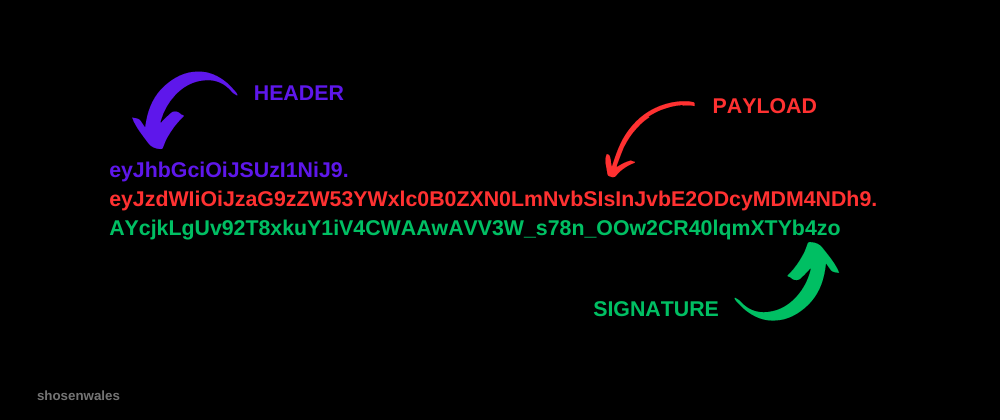
Javascript Web Token (JWT) es una forma segura de transmitir información entre partes como un objeto JSON. Comprende tres partes: **header,** **payload** y **signature**. El header contiene información sobre el tipo de token y el algoritmo de hash utilizado para firmarlo. El paylaod contiene los datos reales que se están transmitiendo, tal como la identidad del usuario o un ID de sesión. La firma se utiliza para verificar la autenticidad del token.
### Términos
* **Estructura JWT**:\
Header (alg + typ) → Payload (claims/datos) → Signature → `..`
* **Algoritmos**:
* **Simétrico** → usa el mismo secreto para firmar y verificar (ej. `HS256`)
* **Asimétrico** → usa un par de claves:\
clave privada para firmar y clave pública para verificar (ej. `RS256`)
* **jwk** → *JSON Web Key*\
Clave pública incrustada directamente en el header del JWT.
* **jku** → *JWK Set URL*\
URL que apunta a un conjunto de claves JWK (JWKS) alojado en un servidor que tú controlas.
* **kid** → *Key ID*\
Identificador usado para seleccionar qué clave, dentro de un JWKS o almacén de claves, debe usarse para verificar la firma.
* **PEM** (*Privacy-Enhanced Mail*)\
Formato contenedor basado en texto que codifica datos criptográficos binarios\
(claves, certificados, CSRs) en Base64 usando delimitadores\
`-----BEGIN-----` / `-----END-----`
### Extensiones/Herramientas
JWT Editor (Burp Extensión)
{% embed url="" %}
### Metodología
#### 1. Inspección Inicial del JWT
* Decodificar **header**, **payload** y **signature** (Base64URL).
* Verificar:
* Algoritmo (`alg`)
* Tipo (`typ`)
* Claims sensibles (`sub`, `iss`, `aud`, `exp`, `nbf`, `iat`, `role`, etc.)
#### 2. Manipulación del Payload
* Modificar valores críticos:
* Roles (`user` → `admin`)
* Identidad (`sub`, `user_id`)
* Tiempos (`exp`, `nbf`)
* Reenviar el token y observar si el backend valida correctamente la firma y los claims.
#### 3. Ataque `alg: none`
* Cambiar el algoritmo a `none`.
* Eliminar la firma.
* Verificar si el servidor acepta tokens sin firma.
* Si funciona: validación criptográfica inexistente.
#### 4. Análisis de Firma Débil (HMAC)
* Si el algoritmo es simétrico (`HS256`, `HS384`, `HS512`):
* Intentar **fuerza bruta del secreto**.
* Usar diccionarios comunes (secrets, passwords, env vars).
```bash
hashcat -a 0
```
### Laboratorios
{% content-ref url="/pages/sbP5UibXjd3f4zoJmMkA" %}
[JWT](/beafn28/web-security/laboratorios-portswigger/jwt.md)
{% endcontent-ref %}
1. Ver si es vulnerable a "unverified signature".
2. Ver si modificando el algoritmo a "none" y elimando la parte de la firma podemos bypass y escalar privilegios.
3. Si usa el algoritmo HMAC crackeamos para ver con qué firma los tokens JWT.
4. Ver si puede aceptar un JWT que incrusta la clave pública utilizada para verificar su firma, sin comprobar si esa clave viene de una fuente fiable.
5. Ver si el servidor no valida que la URL de jku pertenece a un origen confiable.
6. Ver si utiliza el valor de kid para leer, desde el sistema de archivos, la clave utilizada para validar la firma del token.